


 2024-08-01
 Author: SPON COMM
 Page view: 2293
How to choose the Best IP Ceiling Speaker for your Needs
1. What is an IP Ceiling Speaker
An IP Ceiling Speaker is a networked audio system component that delivers sound through the internet protocol (IP). It's part of a larger IP-based communication network, which means it can be controlled and managed remotely, often alongside other IP devices such as IP cameras, IP paging microphone, and access control systems.

2. Key Features to Look for in an IP Ceiling Speaker
Sound Quality:
The network ceiling speaker features a coaxial speaker with a built-in dual-port design, highlighting the low frequencies, especially in the playback of background music where the effect is particularly prominent.
Efficient coverage:
The ceiling-mounted position can achieve a wider audio coverage, ensuring an even distribution of sound.
Scalability:
Utilizing the SIP protocol for audio transmission, it supports VoIP (Voice over Internet Protocol) functions and can seamlessly integrate with other SIP devices, such as SIP phones and SIP gateways.
Remote Management:
It can be remotely configured and managed over the network, such as adjusting volume levels and setting playback times.
3. Applications

IP Ceiling Speaker for School
Public Announcements
Used to disseminate campus news, event information, and schedule changes, ensuring that all students and staff receive important updates in a timely manner.
Emergency Alerts
Provides immediate evacuation instructions or safety guidance during emergencies such as fires, earthquakes, or violent incidents on campus.
Ambient Music
Plays music in hotel lobbies, restaurants, gyms, and other public areas to create a pleasant environment and improve overall guest satisfaction.
Facility Information
Broadcasts information about hotel facilities, special offers, and event arrangements, helping guests make the most of hotel services.

IP Ceiling Speaker for Office
Meeting Systems
Provides high-quality audio transmission in conference rooms, ensuring clear communication during meetings and supporting audio input and output for remote conferencing.
Background Music
Plays soothing background music to improve the office environment, enhancing employee satisfaction and productivity.
Employee Announcements
Broadcasts internal company notices, policy updates, and meeting schedules, ensuring that employees stay informed about company developments.
Emergency Response
Provides clear evacuation instructions and emergency notifications during crises or disasters, ensuring swift and effective responses.

IP Ceiling Speaker For Hotel
In-Room Services
Plays soothing background music in guest rooms and provides hotel service information and facility usage guidelines, enhancing the guest experience.
Emergency Evacuation Instructions
Offers clear evacuation instructions during emergencies such as fires or natural disasters through the speaker system, ensuring guest safety.
Emergency Evacuation Instructions
Offers clear evacuation instructions during emergencies such as fires or natural disasters through the speaker system, ensuring guest safety.
Emergency Evacuation Instructions
Offers clear evacuation instructions during emergencies such as fires or natural disasters through the speaker system, ensuring guest safety.

IP Ceiling Speaker for Retail Stores
Background Music
Plays appropriate background music to create a pleasant shopping atmosphere, enhancing customer experience and encouraging purchases.
Promotion Announcements
Broadcasts information about promotions, new product launches, and discounts, attracting customer attention and boosting in-store sales.
Customer Satisfaction Surveys
Invites customers to participate in satisfaction surveys through the broadcast system, gathering feedback to improve service quality.

IP Ceiling Speaker For Clinics
Background Music
Plays calming music in waiting areas to help patients relax and reduce anxiety during the waiting process.
Paging System
Announces patient numbers to ensure timely calling of patients for their appointments, improving efficiency in patient management.
Health Education
Broadcasts educational information about health and wellness, such as disease prevention tips, to raise patient awareness.
Appointment Reminders
Provides reminders about upcoming appointments to help patients remember their visit times, reducing no-show rates.
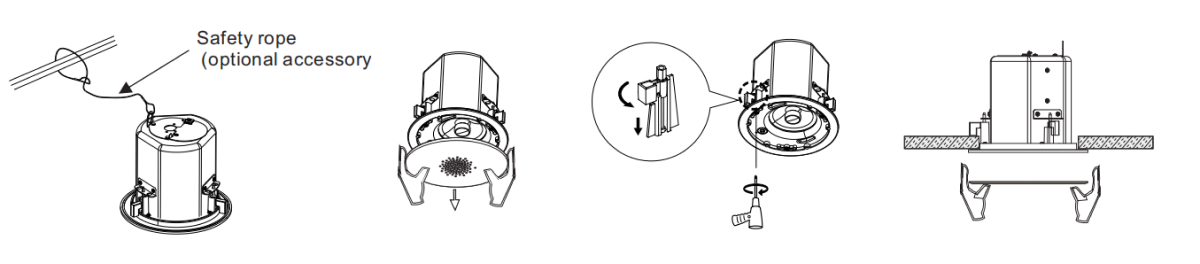
4. Installation Guide for IP Ceiling Speakers
(1)Make a hole at 180 mm diameter in the ceiling.
(2)Fix the safety rope to the steel bars or bolts near the horn opening to prevent the horn from falling.
(3)Take down the grille from the loudspeaker.
(4)Connect the audio signal cable, install the product on the ceiling according to the pre-opened holes, and tighten the screws to Fix the tab with the ceiling.
(5)Re-install the grille.
5.Where to Buy IP Ceiling Speakers: Your Guide to SPON's GEN-6212A01
SPON is proud to offer high-quality IP ceiling speakers that are designed to deliver exceptional audio performance. Our latest release, the GEN-6212A01 Network Ceiling Speaker, is no exception. It boasts a range of features that make it a standout choice for any installation.
Experience the GEN-6212A01's Unique Features:
Ultra-Slim Bezel and Magnetic Grille: Enjoy an aesthetically pleasing design that blends seamlessly into any environment.
Aesthetic Design: A sleek look that enhances the visual appeal of your space.
Built-in Bass Reflex Port: This feature enriches your audio experience with deep, detailed bass.
Enhanced Details: Hear every nuance with our clear and detailed sound quality.
Coaxial Speaker with Adjustable Tweeter: Achieve the perfect balance of sound with adjustable settings.
Maximum SPL of 100dB: Ensures your audio is loud and clear, even in large areas.
Advanced Functionality for Modern Needs:
PoE (Power over Ethernet) and SIP (Session Initiation Protocol) Supported: Simplified installation and compatibility with modern communication systems.
Two-way Audio Intercom: Facilitates clear and effective bidirectional communication.
Remote Health Monitoring: Keep an eye on the status of your speakers from anywhere.
Web Configuration: Easy setup and management through a web interface.
Become a Partner or Find a Distributor
If you're interested in joining forces with SPON and becoming a partner, we invite you to get in touch. We offer a collaborative environment and exciting opportunities for growth.
Alternatively, if you're looking to purchase locally, please contact us to obtain the contact information of our authorized distributors. We're committed to providing you with the best possible service and support, no matter where you are.


 AR
AR
 EN
EN


