


 2025-05-08
 Author: Lennon
 Page view: 6023
In modern network communication, audio and video have become one of the primary forms of media. Whether it's video conferencing, IP broadcasting, network cameras, or streaming platforms, all of these rely on various audio and video protocols for support. In this article, we will provide a comprehensive overview of common audio and video protocols, exploring their purposes, features, and usage scenarios.
What is Audio and Video Protocol ?
Simply put, audio and video protocols are a set of rules or standards used in network environments to transmit, control, and play audio and video content. They define how different devices send, receive, encode, decode, synchronize, and control audio and video data. In actual applications, for example, when we conduct a video intercom, multiple protocols are involved to work together to complete this three stages:

Signaling Stage
The establishment of the session and negotiation of media parameters (such as audio/video formats, port numbers, and other basic information) are completed through SIP (Session Initiation Protocol) and SDP (Session Description Protocol).
Media Transmission Stage
RTP (Real-time Transport Protocol) is used for the real-time transmission of audio and video data, while RTCP (RTP Control Protocol) is used for quality monitoring and transmission status feedback to ensure the stability and smoothness of the media stream.
Video Codec Stage
Audio and video content are typically compressed and decoded using standard encoding formats like H.264 to improve transmission efficiency and reduce bandwidth consumption.
Why are Audio and Video Protocols needed?
In network transmission, audio and video data typically have large file sizes and high real-time requirements. To ensure quality and efficiency, a set of professional protocols is necessary to manage:
Efficiency
Reduce data size through compression and encoding.
Real-time performance
Use low-latency protocols to improve response speed.
Compatibility
Ensure interoperability between different devices and manufacturers.
Stability
Support mechanisms like retransmission, error checking, and quality monitoring.
It is thanks to the support of these audio and video protocols that we can smoothly engage in activities like live streaming, video calls, remote monitoring, and even real-time interactions in the metaverse in our daily lives.
Common Audio and Video Protocols
1.RTP (Real-time Transport Protocol)
RTP is a network protocol used for delivering audio and video over IP networks, commonly used in streaming media systems. It provides end-to-end delivery services for data with real-time characteristics, such as audio or video. RTP typically works with a transport protocol such as UDP (User Datagram Protocol) to ensure the data is transmitted in real time with minimal delay.
Key points:
Functionality: RTP is used to transmit media streams in applications like VoIP (Voice over IP) and video conferencing.
Packet Structure: RTP packets include a header that contains time stamps and sequence numbers, which help the receiver process the media data correctly.
Synchronization: RTP typically works with RTCP (RTP Control Protocol) to monitor the quality of service and provide feedback on media transmission.
★ Application Scenairo:VoIP, video conferencing, live streaming
2.RTSP (Real-Time Streaming Protocol)
RTSP is an application-level protocol used to control the delivery of multimedia content over the network. It allows clients to remotely control media servers, enabling functions like play, pause, stop, and seek in multimedia streams.
Key points:
Control Protocol: RTSP provides mechanisms for users to control the playback of media content, but unlike RTP, it does not carry the media data itself.
Streaming: RTSP is often used for streaming audio or video from servers to client devices, supporting both live streaming and on-demand content.
Usage: It is commonly found in surveillance cameras, media players, and video conferencing systems.
★ Application Scenairo:Video on demand (VoD), IP camera preview
3.SIP (Session Initiation Protocol)
SIP is a signaling protocol used to establish, modify, and terminate multimedia sessions such as voice and video calls. SIP is widely used in voice over IP (VoIP) applications, video conferencing, and instant messaging services.
Key points:
Session Management: SIP is responsible for initiating and terminating calls, as well as negotiating media parameters through SDP.
Text-based: SIP messages are text-based, making it easy to analyze and troubleshoot.
Extensibility: SIP supports a wide range of features and can be extended with additional functionality using SIP extensions.
★ Application Scenairo:IP phone, soft switch, video intercom system
4.SDP (Session Description Protocol)
SDP is a format used to describe multimedia communication sessions in a network. It provides essential information like codec formats, network addresses, and media types to help devices establish and understand communication parameters.
Key points:
Role in SIP: SDP is often used in conjunction with SIP to negotiate and define the parameters of a session, such as which codec to use for audio or video.
Content: An SDP description typically includes session information (e.g., session name), media information (e.g., audio, video), and transport information (e.g., IP addresses and port numbers).
Flexibility: SDP is flexible and can be used across a wide range of communication protocols, not limited to SIP.
★ Application Scenairo:VoIP (Internet phone) call establishment, video conferencing system, IP surveillance system
5.Onvif(Open Network Video Interface Forum)
ONVIF is a global standard for IP-based physical security products. It facilitates interoperability between network cameras, video recorders, and other surveillance equipment from different manufacturers.
Key points:
Interoperability: ONVIF allows devices from different manufacturers to work together within an IP-based security system.
Standardization: The ONVIF standard defines protocols for video streaming, device discovery, and event management in surveillance systems.
Profiles: ONVIF includes several profiles (e.g., Profile S for video streaming) to ensure compatibility between devices and systems.
★ Application Scenairo:Security monitoring equipment connection, IP camera unified management
6.WebRTC (Web Real-Time Communication)
WebRTC is a technology that enables peer-to-peer communication for audio, video, and data sharing directly between browsers, without the need for plugins or external applications.
Key points:
Peer-to-Peer Communication: WebRTC is designed to enable direct communication between web browsers or devices.
Low Latency: It offers low-latency communication for real-time interactions like video calls and live streaming.
Open Source: WebRTC is an open-source project, making it accessible for developers to integrate real-time communication into web applications.
★ Application Scenairo:Web video calls, collaborative office tools
7.RTMP (Real-Time Messaging Protocol)
RTMP is a communication protocol developed by Adobe for streaming audio, video, and data over the internet. Originally designed to work with Flash Player, RTMP continues to be widely used in live streaming applications.
Key points:
Low Latency:RTMP offers end-to-end latency ranging from 2 to 5 seconds, making it suitable for real-time interactive scenarios such as live gaming broadcasts, sports events, and online education.
Reliable Transmission via TCP:RTMP operates over the Transmission Control Protocol (TCP), ensuring that data packets are delivered in order and without loss, which is crucial for maintaining the quality of live streams.
Multiplexing and Chunking:RTMP divides audio, video, and data streams into smaller units called "chunks," allowing for efficient multiplexing and reducing overhead.
Full-Duplex Communication:RTMP supports two-way communication, enabling interactive features such as live chats and real-time feedback during broadcasts.
★ Application Scenairo:Live Streaming Platforms,Surveillance Systems,Online Education and Webinars
Real-World Use Case Examples
1.IP Public Address System
The campus IP public address system utilizes the existing local area network (LAN) to achieve functions such as audio broadcasting, scheduled bell ringing, emergency notifications, and two-way intercom. Compared to traditional broadcasting methods, it offers higher intelligence and controllability, with all devices within the system communicating with each other through network protocols.
| Protocol | Type | Function | Application Scenario |
| SIP | Session Control | Call setup/termination | Teacher paging a classroom, emergency broadcast from control room |
| RTP | Audio Transport | Real-time audio streaming | Live announcements, bell ringing |
| SDP | Media Negotiation | Codec/port negotiation | Negotiating G.711 codec in SIP calls |
| Multicast | Network Transmission | Broadcast audio to multiple endpoints | Playing school bell or music campus-wide |
| IGMP | Network Management | Manage multicast group membership | Classroom terminals auto-join music group |
| HTTP | File Transfer | Retrieve audio resources | Terminals download bell or announcement files |
| TCP | Control Communication | Deliver playback/control commands | Start/stop playback, adjust volume |
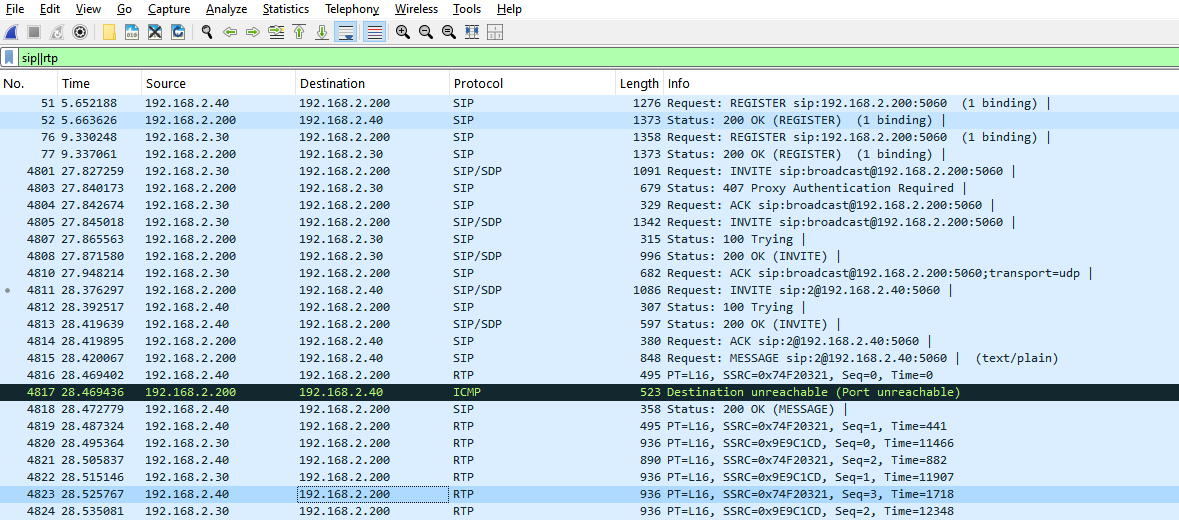
Wireshark Example(Paging from IP microphone 192.168.2.30 to IP speaker 192.168.2.40, Server IP 192.168.2.200):
Process Description:
1.Registration request successful(SIP)
2.Point-to-point SIP session established(SIP/SDP)
3.Get zone information from server(HTTP)
4.Audio data transmission(RTP)
5.SIP session end(SIP)

2.IP Video Intercom System
Enterprise IP video intercom systems enable audio and video communication between multiple points over an IP network, supporting functions such as access control integration, remote control, and information broadcasting. These systems are commonly used in office buildings, campuses, and corporate headquarters. They integrate various functions including voice intercom, video calling, access control, and information distribution.
| Protocol | Type | Function | Application Scenario |
| SIP | Session Control | Establish/manage call sessions | Enables audio/video intercom, emergency calls |
| RTP/RTCP | Media Transport | Audio/video streaming, quality control | Real-time transmission of voice and camera footage |
| SDP | Media Description | Negotiate audio/video codecs | Determines video resolution, audio format, etc. |
| RTSP | Stream Control | Play/pause media streams | Used for live video monitoring and playback control |
| Onvif | Security Integration | Standard protocol for video devices | Integrates with existing surveillance or door stations |
| HTTP | Data Communication | Data transfer, API interaction | Pushes visitor info, triggers remote access control |
| TCP/UDP | Transport Layer | Ensures data and voice delivery | TCP for commands, UDP for real-time voice/video |
Wireshark Example(Video Intercom between IP video microphone 192.168.2.60 and IP intercom 192.168.2.50, Server IP 192.168.2.200):
Process Description:
1.Registration request successful(SIP)
2.Point-to-point SIP session established(SIP/SDP)
3.Auido and video transmission(RTP/H.264)
4.Onvif request(HTTP/XML)
5.SIP session end(SIP)


Protocol Comparison
The following table lists the characteristics of common protocols:
| Protocol | Type | Main Purpose | OSI Layer | Media Transport | Typical Use Cases |
| SIP | Signaling | Initiate/manage/terminate sessions (e.g. calls) | Application Layer | Works with RTP | VoIP, IP Intercom, Video Conferencing |
| SDP | Description | Describe media parameters (codec, ports, etc.) | Application Layer | Embedded in SIP/RTSP | Media negotiation |
| RTP | Media Transport | Real-time transport of audio/video streams | Transport Layer | Typically over UDP, sometimes TCP | Live Audio/Video, Streaming |
| RTSP | Control | Control media playback (play/pause/seek) | Application Layer | Works with RTP | Video Surveillance, VOD Systems |
| ONVIF | Interface/Standard | Standardized control & discovery for security devices | Application Layer | Uses SOAP/XML over HTTP | IP Cameras, NVRs, Surveillance Systems |
| WebRTC | Communication Framework | Real-time audio/video/data in browsers | Multi-layer | RTP + STUN/TURN for NAT traversal | Browser Calls, Interactive Live Video |
| RTMP | Media Transport | Real-time audio/video stream transmission | Transport Layer | Transmits audio/video streams | Live Streaming, Video Streaming |
Conclusion
Audio and video protocols are at the core of modern communication and multimedia transmission. Each protocol is optimized for specific needs, such as RTP and SIP, which focus on real-time transmission and session control; RTSP, which is used for streaming media control; and H.264 and H.265, which provide efficient video compression. WebRTC offers robust support for real-time communication based in the browser.
When selecting audio and video protocols, it is essential to consider factors such as the application scenario, transmission requirements, and bandwidth limitations. Understanding the features and applicable ranges of these protocols can help businesses and developers optimize the performance and user experience of multimedia applications.


 AR
AR
 EN
EN


