


 2025-02-28
 Author: cora
 Page view: 7180
Whether you’re hosting a school event, playing in a band, or giving a speech, microphone feedback can ruin the experience. But don’t worry—fixing feedback is easier than you think. In this blog, we’ll break down why feedback happens and share simple, actionable tips to eliminate it. Let’s make your PA system sound amazing!
Microphone feedback is the loud, high-pitched noise that occurs when sound from a speaker is picked up by a microphone and re-amplified repeatedly. In a PA system, this happens because the microphone captures the audio output from the speakers, sends it back through the amplifier, and plays it again through the speakers. This creates a loop where the same sound is amplified over and over, growing louder until it becomes a disruptive screech or rumble.

A basic PA system includes three components: a microphone, an amplifier, and speakers. Feedback occurs when these parts interact improperly. For example, the mic and speakers are too close, the volume is cranked up too high, or the room’s hard surfaces (like walls or floors) bounce sound around.
Feedback in PA systems can be frustrating, but understanding its common causes can help prevent it.

Microphone Placement and Sensitivity
Microphones are sensitive to sound, and when placed too close to speakers, they can pick up amplified sound, causing a feedback loop. To avoid this, ensure the microphone is at an appropriate distance from the speakers and avoid pointing it directly toward them.
Speaker and Microphone Positioning
If a microphone is too close to or directly facing a speaker, the sound can bounce back into the microphone, causing feedback. Position the microphone and speakers at angles to each other to reduce the risk of this happening.
System Settings and Volume Levels
High volume levels increase the chances of feedback. When the system’s volume is set too high, the microphone picks up sound from the speakers, leading to a feedback loop. Keep the volume balanced and adjust system settings to minimize feedback.
1. Keep Mics Away from Speakers
If a mic is too close to a speaker, it picks up the amplified sound and starts a feedback loop.
Place microphones at least 3–6 feet from speakers. For example, position floor speakers on the sides of a stage, not directly behind the presenter.
2. Position Mics Close to the Sound Source
The closer the mic is to the person speaking or singing, the less you need to crank up the volume.
Hold handheld mics 1–2 inches from the mouth. For podiums, use a gooseneck mic positioned near the speaker’s face.
3. Use Directional Microphones
Directional mics ignore sound from behind them, reducing feedback risk.
Point the mic’s “sweet spot” (front) toward the speaker’s mouth and keep the “dead zone” (back) facing the speakers.
4. Mute Unused Microphones
Every open mic is a potential feedback source.
Turn off mics that aren’t in use—especially in multi-mic setups like conferences or panels.
5. Use Equalizers to Target Problem Frequencies
Feedback often happens at specific high-pitched or rumbling frequencies.
· Graphic EQ: Cut frequencies where feedback occurs (e.g., 2,000–8,000 Hz for screeching).
· Parametric EQ: Narrowly target and reduce the exact frequency causing issues.
· Quick trick: Slowly raise the volume until feedback starts, then cut that frequency on the EQ.
6. Add a Feedback Eliminator
These devices automatically detect and block feedback frequencies.
Plug a feedback suppressor (like a DBX DriveRack or Behringer Shark) between your mixer and speakers.
7. Soften Acoustics
Hard surfaces (concrete walls, tile floors) reflect sound, creating echoes that fuel feedback.
Add carpets, curtains, or foam panels to absorb reflections. For stages, use portable acoustic screens.
Solutions: Practical Tips for Different Site
Feedback can be challenging in various environments, but with the right solutions, you can ensure clear sound in any space.

1. Feedback Solutions for Small Rooms
In small rooms, the sound can quickly bounce back into the microphone, leading to feedback. To reduce this, position the speakers away from the microphones and aim them directly at the audience. Use directional microphones to focus on the speaker’s voice and avoid picking up surrounding sounds. Additionally, lower the volume and gain to prevent amplification of unwanted noise.
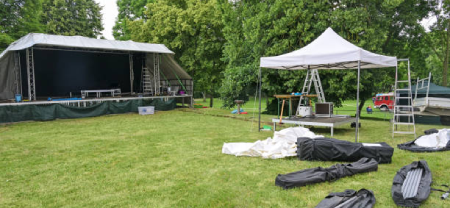
2. Feedback Solutions for Large Events and Outdoor Spaces
For large events or outdoor spaces, feedback can be a challenge due to the distance between speakers and microphones. Ensure that speakers are positioned high and angled toward the audience, while microphones are placed further away from the speakers. Use wireless microphones with directional patterns and implement delay systems to synchronize sound across the venue. Setting appropriate levels for the sound system can also prevent feedback in these large areas.

3. Tips for Conference Rooms and Meeting Spaces
In conference rooms and meeting spaces, feedback can occur when microphones and speakers are too close to each other. Position speakers in the corners of the room and microphones closer to the speaker or presenter. Use boundary microphones or table mics, which are less sensitive to ambient noise. Keep the system’s volume at a moderate level and use an equalizer to reduce problem frequencies.
By adapting these solutions to your specific environment, you can minimize feedback and achieve clear, high-quality sound in any space.

Regular maintenance is key to preventing feedback and ensuring your PA system works at its best.
· Weekly Cleaning:
Clean your equipment weekly by wiping down microphones, mixers, and speakers with a dry cloth to prevent dust from affecting sound quality.
·Monthly Cable Checks:
Test cables and connectors each month, replacing any damaged or loose wires to avoid noise and unexpected feedback.
·Regular System Updates:
Keep your digital devices, like feedback suppressors, up to date by upgrading their software, which can enhance performance and reduce issues.
·Timely Replacements:
Replace worn-out microphone windshields, damaged speaker drivers, or old wireless mic batteries to maintain clear and reliable sound.
In addition to these maintenance checks, proper operation is crucial. Eliminating feedback in your PA system is not difficult, and SPON not only provides high-quality products but also offers expert support from our professional engineers to help you enhance your knowledge and solve any issues you encounter.
Audio feedback (microphone feedback) is a common issue we often encounter. It happens when a microphone picks up sound from the speaker, creating an annoying "noise." This article explained what microphone feedback is, why it occurs, and how to prevent it. We hope these tips help you manage feedback and improve your audio experience.
1. Can I Use a Wireless Microphone Without Feedback?
Yes, wireless microphones can avoid feedback if positioned away from speakers and set at proper gain levels. Use directional mics and maintain distance to minimize risks.
2. Why Does Feedback Occur Only in Certain Venues?
Feedback depends on room acoustics—hard surfaces (like concrete) reflect sound into mics, while soft materials (curtains, carpets) absorb it, reducing feedback chances.
3. What is the best microphone to avoid feedback?
Directional microphones (e.g., cardioid or supercardioid) reject sound from behind and sides, making them ideal for feedback prevention.
4. How to avoid wireless microphone interference?
Choose clear UHF frequencies, keep transmitters close to receivers, and avoid Wi-Fi routers or other wireless devices operating on similar bands.


 AR
AR
 EN
EN


