


 2024-11-18
 Author: SPON COMM
 Page view: 2064
How to Design Conference Systems for Different Meeting Rooms?
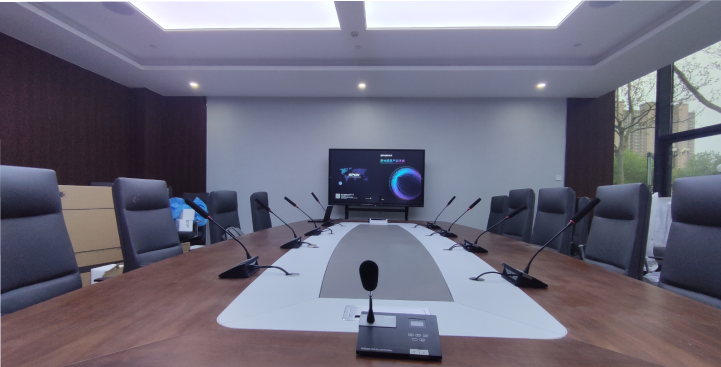
1、Small Meeting Room Requirements
Small meeting rooms typically have limited space and accommodate 5-10 people, mainly for quick discussions or small-scale meetings. The key requirements focus on enabling remote collaboration and improving meeting efficiency.
They often need networked video conferencing systems to expand participation, supporting HD audio-video transmission, file sharing, and interactive whiteboarding for enhanced productivity. Additionally, ventilation, lighting, and acoustic features should be optimized to ensure a comfortable meeting environment.
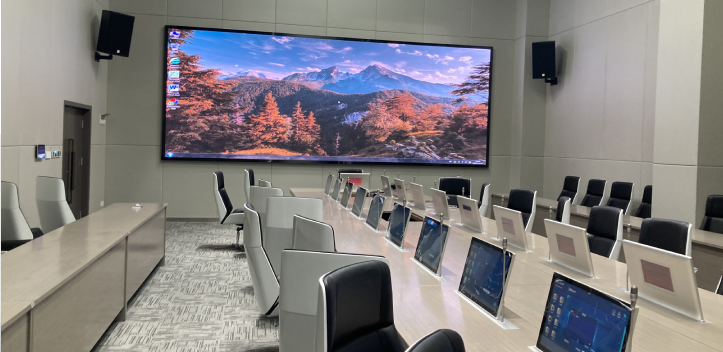
2、Medium Meeting Room Requirements
Medium meeting rooms are designed for 10-20 people and are commonly used for team meetings, presentations, and brainstorming sessions. The main requirements include advanced video conferencing systems that support a larger number of participants and provide high-quality audio and video. These rooms often need solutions for seamless collaboration, such as interactive whiteboards, screen sharing, and file sharing. A central microphone system may be necessary to ensure everyone is heard. Furthermore, acoustics, lighting, and room layout are critical to maintain a productive and comfortable atmosphere for all attendees.
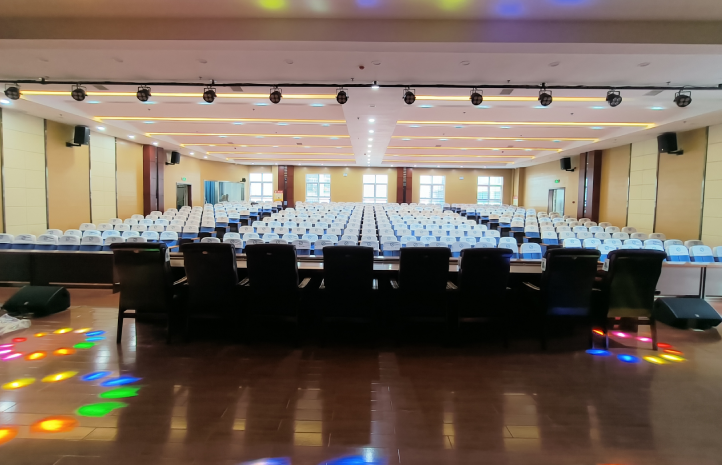
3、Large Meeting Room Requirements
Large meeting rooms, designed for over 40 participants, are often used for group training, executive presentations, and work reports. These spaces require a robust, feature-rich video conferencing system to enhance internal communication efficiency and ensure smooth operations at the organizational level. Key considerations include secure communication and content privacy to protect sensitive information, along with intelligent systems to expedite decision-making processes.
High standards in room design and equipment are essential. These rooms may need multi-screen displays or multiple projection systems for primary and secondary streams, advanced audio amplification systems, additional viewing monitors, digital conference systems, electronic nameplates, simultaneous interpretation systems, audio-visual processing, and adjustable lighting systems. These features create a versatile, professional environment tailored to varied meeting needs.
What factors should be considered when deploying a conference system?

Small Conference Room Deployment Recommendations:
Network Video Conferencing System Solution:
Utilizing internet resources, small conference rooms can opt for a network video conferencing system. This solution is cost-effective, quick to deploy, and suitable for various scenarios like business negotiations and remote work.
Enterprise Internal Private Deployment Solution:
For medium to large enterprises, an internal private video conferencing system deployment can be considered. This option offers advantages such as security, flexibility, and cost-effectiveness.
Professional Hardware Video Conferencing System Solution:
For scenarios with high video conferencing quality requirements, a professional hardware-based system is recommended. These systems typically offer high-definition video quality, robust network bandwidth support, and stable audio and video transmission.
Equipment Selection:
Since small conference rooms are limited in space, they typically do not require additional equipment such as conference audio systems. The focus should be on simplicity and practicality, with the room only needing to provide power outlets and network ports.
Medium-sized Conference Room Deployment Recommendations
1. Layout Plan:
In addition to the video conferencing system, a medium-sized conference room should also be equipped with desktop flip screens, conference audio systems, discussion and speaking systems, and display systems.
2、Decoration Guidelines:
The wall color should be a uniform light tone. The lighting should provide a vertical illuminance of 300±100 lux for faces. For acoustics, the ceiling should be equipped with perforated sound-absorbing materials, and the floor should be covered with carpet.
3、Equipment Selection:
The conference room should be equipped with a multifunctional smart display. To meet the needs of participants watching secondary content, a projection system should be installed to display the auxiliary stream, which can also be used for local meetings. An external audio system should be added, and an interactive electronic whiteboard can be used for real-time information interaction with remote locations.
Large Conference Room Deployment Recommendations:
Layout Plan:
In addition to the video conferencing system, a large conference room should also be equipped with a desktop flip screen system, conference sound system, discussion and speaking system, simultaneous interpretation system, and display systems.
Decoration Guidelines:
For rooms with a ceiling height of over 3 meters, a central decorative light canopy can be installed. The design of the light canopy should coordinate with the shape of the conference table to maintain visual harmony.
Equipment Selection:
The setup should include a video conferencing terminal, video system (including HD cameras, video processors, and main/auxiliary stream display systems), sound amplification system (including microphones, audio processors, amplifiers, speakers, etc.), and a central control system (including control host, touchscreens, etc.).
How to choose the equipment list for different meeting rooms?
Equipment requirements for small meeting rooms:
A small meeting room typically refers to a room for fewer than 5 people. Below is the equipment requirement list:
1) Video Conference Terminal: Multi-functional smart terminal, supporting stand, mobile, and wall-mounted options.
2) Display Equipment: Projector or LCD TV for presenting slides, videos, and other content.
3) Audio Equipment: Omnidirectional or directional microphones, and active speakers, or TV speakers.
4) Video Input Equipment: PTZ (Pan-Tilt-Zoom) HD camera.
5) Control System and Interfaces: Used to centrally control audio and video equipment, lighting, curtains, etc., providing an easy-to-use user interface.
6) Network Connection: Ensure the meeting room has reliable network connectivity to support internet access and video conferencing.
7) Power and Cable Management: Ensure sufficient power outlets are available and use a cable management system to hide and organize wires.
Key Considerations:
1) Microphone Selection: Choose an omnidirectional full-duplex microphone that supports 360° audio pickup. For small meeting rooms under 20 square meters, a microphone with a 3-5 meter pickup radius should suffice.
2) Speaker Integration: Modern omnidirectional microphones often include built-in speakers. Unless there are specific high-quality sound requirements, external speakers are unnecessary.
3) Conference Panel: The conference panel, which has gained popularity in recent years, offers wireless screen sharing, multi-screen interaction, and smart whiteboard features. It’s ideal as an all-in-one unit with a stand for easy mobility.
4) All-in-One Conference System: A video and audio integrated system with built-in cameras and microphones, suitable for executive offices and micro meeting rooms. It offers easy installation and deployment.
5) Network Connectivity: Ensure reliable network connectivity in the meeting room to support internet access and video conferencing.
6) Power and Cable Management: Ensure sufficient power outlets and use a cable management system to hide and organize wires.
Equipment requirements for medium meeting rooms:
A medium-sized meeting room typically refers to a room that accommodates between 10 and 20 people. Below is the equipment requirements list:
1) Video Conference Terminal: Smart Cloud Video Terminal M30, supports multiple video conferencing platforms.
2) Wireless Microphone: OM-10W, 10-meter obstacle-free transmission with a 4-meter pickup radius.
3) Display System: Projection system used to display secondary streams, can also serve as the local meeting display.
4) Audio System: External sound system to meet the required speech amplification for the meeting.
5) Interactive Electronic Whiteboard: Real-time information interaction with remote venues.
6) Central Control System: Central control unit, touch screen, etc., for centralized control of the meeting room equipment.
Key Considerations:
1) Equipment Selection: Choose suitable video conferencing equipment for medium and small-sized meeting rooms, including cameras, microphones, speakers, etc., ensuring the equipment is reliable in quality and stable in performance.
2) Camera Placement: Place the camera in one corner of the meeting room, ensuring it can capture the facial expressions of all participants. If a panoramic view is needed, consider using a wide-angle camera.
3) Microphone Placement: Depending on the size of the meeting room, multiple microphones may be needed to ensure clear capture of all participants' voices.
4) Speaker Placement: Choose speakers suitable for medium and small-sized meeting rooms, ensuring clear sound quality and adequate volume.
5) Acoustic Requirements: It is recommended to install perforated sound-absorbing materials on the ceiling and carpets on the floor to reduce noise and improve acoustics.
6) Lighting Requirements: Ensure a vertical illuminance of 300±100 lux on faces, using diffused lighting with a tri-color light source.
Equipment requirements for large meeting rooms:
For large conference rooms, typically designed for more than 40 people, the following equipment is required:
1) Video Conference Terminal: Used to support video conferencing, view local and remote auxiliary streams, and remote audio amplification.
2) Video System: Includes HD cameras, video processors, and main/auxiliary stream display systems.
3) Audio Amplification System: Includes microphones (MIC), audio processors, amplifiers, speakers, and other audio equipment.
4) Central Control System: Central control unit, touchscreen, and other components to manage conference room equipment.
5) Simultaneous Interpretation System: Added as required based on the meeting's language needs.
6) Electronic Nameplates: Added as required based on the meeting's needs.
7) Audio-Visual Processing System: Added as required depending on the meeting's complexity.
8) Adjustable Lighting System: Added based on the meeting's lighting needs.
Key Considerations:
1) Multi-functional Equipment: In addition to a video conferencing system, large conference rooms may also be equipped with desktop flip-screen systems, conference sound systems, conference discussion systems, display systems, etc.
2) Display System: May require multi-screen displays or multiple projectors for main and auxiliary stream displays, along with additional audio amplification systems.
3) Acoustic Requirements: It is recommended to use perforated acoustic materials for the ceiling, with sound-absorbing walls and carpeting on the floor to reduce noise and improve sound quality.
4) Lighting Requirements: It is advised that the vertical illumination on faces reach 300±100 lux, using diffused lighting fixtures with a full-spectrum light source.
5) Equipment Selection: Based on the specific needs of the conference room, additional equipment may include supplementary display screens, return display screens, digital conferencing systems, electronic nameplates, simultaneous interpretation systems, audio-visual processing systems, and adjustable lighting systems.
Cases


The above considerations cover various aspects, including equipment selection, layout, and environmental requirements, to ensure the effective deployment and use of conference room equipment. In conclusion, with the wide variety of video conferencing equipment available on the market, the deployment of video conferencing systems should be based on specific needs to select the most suitable equipment.


 AR
AR
 EN
EN


