


 2025-04-11
 Author: cora
 Page view: 3815
Common PA MICs include Handheld, Gooseneck and Desktop Paging Microphones. Public address systems rely heavily on high-quality microphones to ensure clear audio transmission in a variety of venues, from corporate conference rooms to sports stadiums. In this blog, we will explore the main PA microphone types, their applications and choose.
Why Upgrade to IP Microphones?
Smarter, cleaner, scalable audio with better quality and control.
1.IP microphones use common network cables, making setup simpler and cheaper than old-style wiring.
2.They make sound clearer by turning it into digital right at the microphone, cutting down on noise and disruptions.
3.Remote setup and control let users manage devices from anywhere, saving time and work.
4.They work smoothly with IP systems like intercoms, speakers, and security cameras, creating a unified setup.
5.PoE lets one cable handle both power and data, making installation easier.
6.IP systems are easy to expand, so adding more microphones is simple and doesn’t need extra cables.
7.Features like DSP, noise reduction, and voice-triggered alerts make them great for smart, fast-reacting workplaces.
Types of PA Microphones

1. Handheld Microphone
A handheld microphone is the most common type. You hold it in your hand, or put it on a stand. It is small and easy to use. It picks up sound directly. People use it for speeches, hosting, shows, or public speaking.
Pros: Easy to control. You can point it where you want. It works well in many places. Wireless models let you move freely.
Cons: You must hold it. Long use may be tiring. It may make handling noise. Wired models limit your movement.
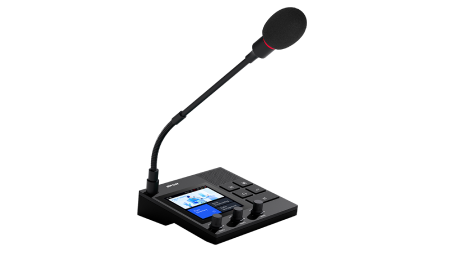
2. Gooseneck Microphone
This is a long, thin mic on a desk or podium. It has a bendable neck. You can point it at the speaker. It is often used in meetings or studios.
Pros: Hands-free. Easy to adjust. It looks neat and sounds clear. It blocks background noise well.
Cons: Only works for one person at a time. Not good for group talks or far-away voices.
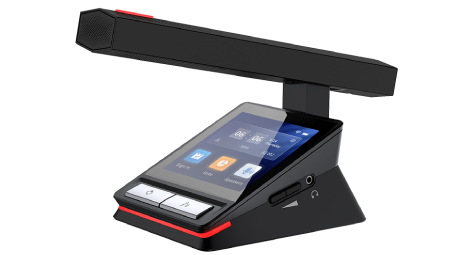
3.Desktop Paging Microphone
This mic is fixed on a base with buttons. You press buttons to make announcements or talk to certain areas. It is used at front desks, control rooms, and security rooms.
Pros: Powerful features. You can control zones, give emergency messages, or set speaking order. Easy to use.
Cons: It stays in one place. Not good for live events or moving around.
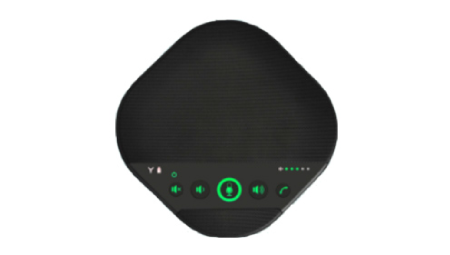
4. Boundary Microphone
This mic sits flat on a table or floor. It picks up sound from many directions. It is good for meetings or recording a room’s sound.
Pros: Can hear many people at once. Easy to hide. It is flat and not in the way. Great for video calls or studios.
Cons: Picks up background noise like table taps or footsteps. Not good in loud places.
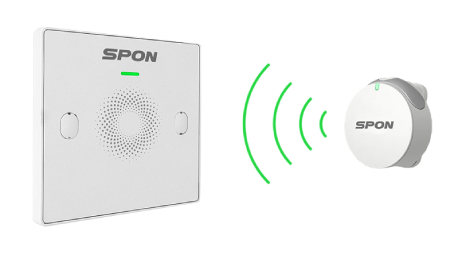
5. Wireless Microphone
This mic sends sound with no cable. It can be handheld, clip-on, or headset. It is good for people who need to walk around, like in shows or training.
Pros: No cables. You can move freely. It gives the speaker more freedom.
Cons: Signal can be weak or lost. Batteries can run out. It needs a receiver and costs more.

6. Lavalier (Clip-on) Microphone
This mic is small and light. You clip it on your shirt. It usually works with a wireless pack. It is close to your mouth and good for hidden or hands-free speaking.
Pros: Hands-free. Easy to wear. It does not stop you from moving. Great for hosts, speakers, or video.
Cons: Picks up sound from a small area. Placement affects sound. May catch noise from clothes.

7. Headset Microphone
This mic is worn on your head. The mic stays near your mouth. It keeps a steady distance for good sound. People use it when moving a lot, like in sports or training.
Pros: Sound stays clear. Hands are free. Good for fitness coaches, guides, or active speakers.
Cons: Can be uncomfortable after long use. Not good for quiet or formal places. Looks less formal.
How to Choose the Best Microphone for an IP System?
Choosing the best microphone for your IP system depends on a number of factors, including the intended application, environment, and specific system requirements. The following guide can help you select the right microphone for your IP system:
1. Understanding the Requirements
Conference/Seminar: If you need a microphone for a conference call or meeting, a gooseneck or interface microphone is ideal. These microphones are usually fixed mounted and provide clear, high quality sound.
Public speaking/announcements: Handheld microphones or wireless microphones are better because of their mobility and flexibility.
Personal use (lecturers, presenters): Lavalier microphones or head-worn microphones are ideal for hands-free operation and comfort during long lectures or presentations.
2. Check compatibility with IP systems
VoIP compatibility: Make sure that the microphone is designed for use with IP-based systems, such as VoIP (Voice over IP) systems. Some microphones are designed for IP environments and support features such as PoE (Power over Ethernet).
Wired or wireless: Determine whether you need a wired or wireless microphone. Wired microphones may be more stable, but wireless microphones offer greater freedom of movement. Wireless microphones are often a good choice for the flexibility of IP systems, especially in large spaces or where people are moving around.
3. Microphone Types
Directional vs. Omni-directional:
Directional microphones (e.g. cardioid) are best suited for noisy environments because they pick up sound from one direction and suppress background noise.
Omnidirectional microphones pick up sound from all directions, which is useful in conference rooms or environments where multiple people are speaking from different positions.
Noise Cancellation: If you are in a noisy environment, choose a microphone with noise cancellation technology. This feature helps eliminate unwanted background noise and ensures clear voice transmission.
4. Sound Quality
Frequency Response: Select a microphone with a wide frequency response to capture clear, natural speech.
Sensitivity: A microphone with the right sensitivity captures the speaker's voice without picking up excessive background noise.
Click learn more about Parameters:
5. Easy to install and use
Plug-and-play setup: Choose a microphone that is easy to install and integrates with your IP system without complicated setup. Ideally, the microphone should work seamlessly with your IP network and require minimal configuration.
User-friendly controls: If the microphone is to be used in a conferencing environment, make sure it has intuitive controls (e.g., volume, mute buttons) and is easy to manage remotely when needed.
6. Environmental considerations
Room size and acoustics: Larger rooms or multi-person spaces may require boundary or ceiling microphones to clearly capture a wide range of sound. In smaller rooms, a desktop paging microphone or gooseneck microphone may be sufficient.
Of course you can also consider weather and temperature conditions, etc., if you are specializing in a particular geographic location special project.
7. Budget and Brands
Budget: High-end microphones usually have better sound quality, more advanced features, and greater durability. However, make sure the microphone is within your budget.
Brand and quality: Choose a reliable brand with extensive experience in audio equipment for IP systems, such as SPON, which offers high-quality and reliable microphones.
8. Other features to consider
PoE: If you're building a microphone network, PoE-enabled models can simplify cabling and reduce the need for separate power supplies.
Adjustable stand and flexibility: For flexibility, look for a microphone with an adjustable stand, gooseneck, or wireless option for easy repositioning.
In Short:
♦ Best for meetings: Gooseneck or boundary mic.
♦ Best for moving around: Handheld or wireless mic.
♦ Best for hands-free use: Clip-on or headset mic.
♦ Best for noisy areas: Directional mic with noise canceling.
Choosing the right microphone depends on your specific needs, space and system integration. Be sure to evaluate these factors before making a decision.
Conclusion
Selecting the right PA microphone type depends on your venue’s needs, but IP microphones ensures seamless performance, scalability, and smart control. At SPON, we specialize in IP audio solutions designed for modern and smarter.


 AR
AR
 EN
EN


