


 2024-11-25
 Author: SPON COMM
 Page view: 1499
What is SIPLink?
SIPLINK series consists of a variety of different forms of network audio terminal, the system can be used as an independent audio system, but also can be integrated with external systems and platforms (such as video surveillance platform, internal communication system, fire alarm system, etc.), linkage, operation, etc.
The SIPLINK family can interact with multiple systems in the same installation and provides a variety of freedom of configuration for system design.

System Key Benefits
1. Standard Protocol
It meets common standard protocols such as SIP, ONVIF, and Multicast.
2、Audio Management
Upload, Download, Preview Priority, Volume Control.
3、Easy Usage
Calendar View, Browser Interaction.
4、Flexible Integration
НТТР API, Control Input and Output.
5、Audio Source Type
Microphone Panel, MIC, Line, Bluetooth, Local Audio Files.
6、Stable & Reliable
ARM Architecture, Linux System.
Why SIPLINK?
1、Flexible Integration

SIPLINK series network terminals use standard audio communication and control protocols, which can communicate with third-party external devices or platforms (NVR, sensors, SIP phones, VMS platforms, SIP servers, etc.) to help build a complete integrated system and elevate the entire network solution to a new level. The device provides flexible audio communication over the network.
SIPLINK can be added to integration projects as a "component" to meet audio system functional requirements.
2、Server-Free & Scalable
The SIPLink series can operate in standalone mode without the need for a dedicated server, allowing for a minimal system budget. A single network terminal can fulfill the basic broadcasting functions (realtime, scheduled, and HTTP API). By configuring and combining these network terminals, a large audio communication system can be formed.
3、Audio Communication Business Process
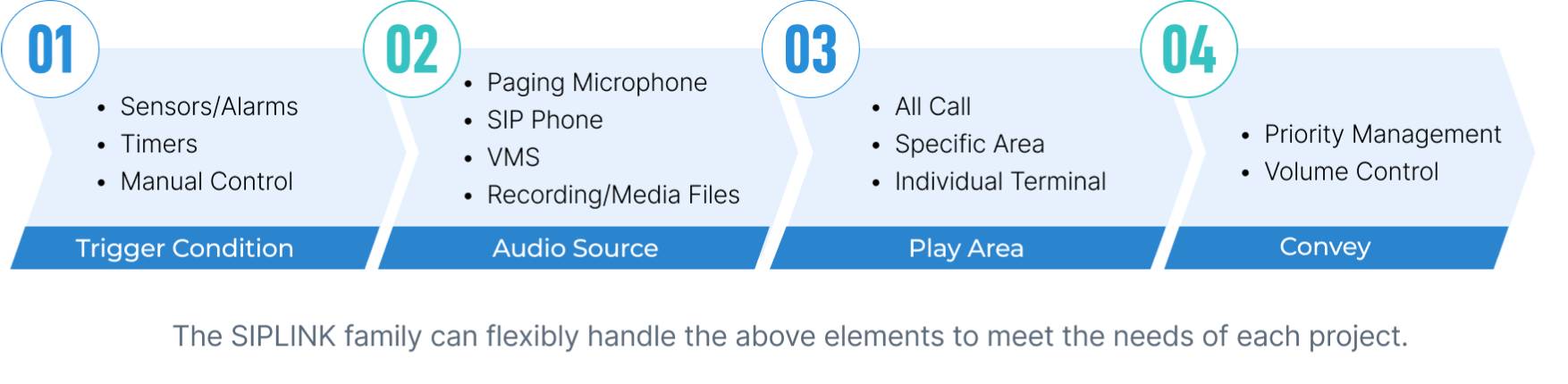
The SIPLINK family can flexibly handle the above elements to meet the needs of each project.
Key Broadcast Functions
1、Built-in Audio Files

20 audio files (total 80MB)
MP3, WAV
Volume setting, repeat count, and interval time
Supports HTTP API interface calls
2、VMS Broadcast

Broadcasts can be initiated through the Onvif protocol by VMS (Video Management System) software.
Compatible with PCMU and PCMA audio codecs.
3、SIP Broadcast

Compatible with G.722, PCMU, and PCMA audio codecs.
4、Multicast

All transmitter devices support audio streaming to up to 20 multicast addresses.
All receiver devices support audio reception from up to 20 multicast addresses.
5、Two-Way Communication

Audio monitoring and two-way communication can be achieved
Audiolnput: MIC/LINE
6、Priority Management

The priority between broadcast types and patterns can be set on each device.
Default priority as below (from hight to low)
Benefits Advantages
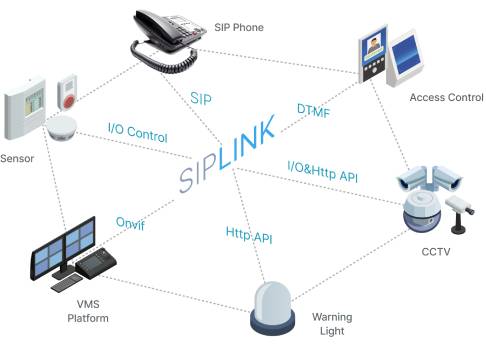
Standard, Open, Compatible
The SIPLink series are based on standard SIP, ONVIF audio, multicast audio, and HTTP command open interfaces, allowing the entire SIPLink series to be directly deployed in a network system and easily integrated into different systems such as VMS (Video Management Systems) or SIP phone systems.

Independent, Combined, Flexible
All receivers in the SIPLink series can operate as an independent Network PA system, supporting realtime broadcasts, built-in timers, and control input-triggered alarms. All receivers also can integrate into other systems to form a more powerful network audio solution. Additionally, all receivers support priority management for flexible handling of audio source priorities.

Smart, Convenient, Efficient
All receivers in the SIPLink series support receiving up to 20 multicast addresses. They can send multicast audio streams directly to a specific address via the GEN-9102N network paging microphone. For systems and devices that do not support multicast, the GEN-2001 network broadcasting gateway solves the issue by converting SIP or ONVIF calls into multicast streams for transmission.
Functional Applications
01.Independent Standalone System Operation

02.Advanced PA System Integration

03.SIP Phone System Integration

04.VMS System Integration


Critical Products
1、Network Paging Microphone
GEN-9102N: Flexible Control Station for the SIPLink Series
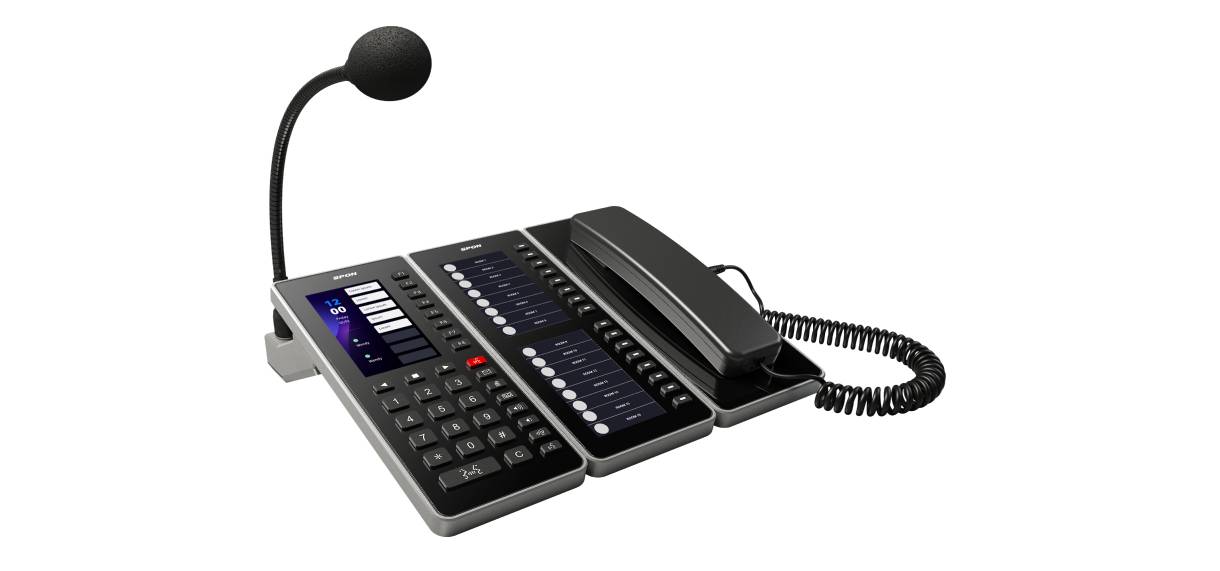
Product Introduction
The GEN-9102N serves as the mian control console for the SIPLINK series. It features multifunctional quick-access buttons and can be expanded with two auxiliary display screens and a handset to facilitate the simultaneous display of all quick-access functions and high-definition private calls. Additionally, it includes a built-in 1GB media storage, supporting a unique pre-recording feature that enhances droadcast Texiollity tor clents.
Custom Shortcut Keys
Easily configure shortcut operations through the web page for one-touch operation.
Multicast Zoning
A single GEN-2001 can manage 20 multicast addresses and ports, designed for partitioned broadcast applications.
Calendar Scheduler
WEB GUI Visual Scheduling Console for Timed Triggering of Various Tasks.
HTTP Command Publishing
Generic HTTP commands support convenient batch sending to any device that supports HTTP Commands.
2、Network Paging Gateway
GEN-2001:SIPLink Series Intelligent Hub

Product Introduction
The GEN-2001, as the 'strongest brain' of the SIPLink series, transforms the entire SIPLink series into a powerful communication system, while also supporting integration with external systems or platforms for mutual signal reception and transmission.
Audio Protocol Conversion
Convert audio sources sent via different protocols into multicast format for broadcasting.
Products As Receivers

1、GEN-3001A03 Network Audio Interface
Receive SIP audio, ONVIF audio, Bluetooth, and multicast
Local broadcasting using built-in audio files or local audio sources (MIC)
The terminal supports 2 functional keys, enabling one-touch calling and triggering local broadcasting
4 control inputs and 1 control output
Built-in 80MB file storage (20 files, WAV/MP3) |
HTTP commands (receive)
Playback tasks (repeat, weekly timer)
Powered by POE/POE+, DC power
2*30W (DC powered), built-in power amplifier, 1 audio output
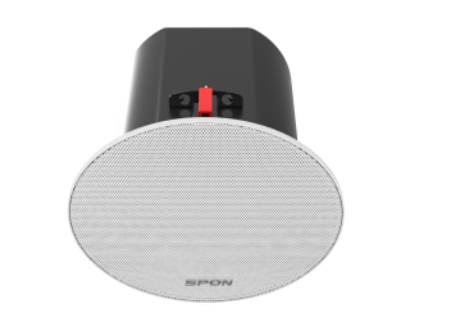
2、GEN-6212A01 Network Ceiling Speaker
18 cm Ceiling-Mount Conical Speaker
Receives SIP audio, ONVIF audio, Bluetooth, and multicast
Local broadcasting using built-in audio files
20W built-in power amplifier, with built-in MIC, supports intercom
2 control inputs and 1 control output
80MB built-in file storage (20 files, WAV/MP3)
HTT commands (receive)
Playback tasks (repeat, weekly timer)
POE/POE+, DC power supply
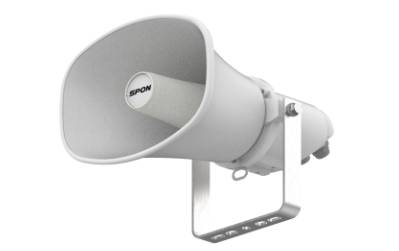
3、GEN-6392A01 Network Horn Speaker
Receives SIP audio, ONVIF audio, and multicast
Local broadcasting using built-in audio files
10W built-in power amplifier, with built-in MIC, supports intercom
2 control inputs and 1 control output
80MB built-in file storage (20 files, WAV/MP3)
HTTP commands (receive)
Playback tasks (repeat, weekly timer)
POE/POE+, DC power supply
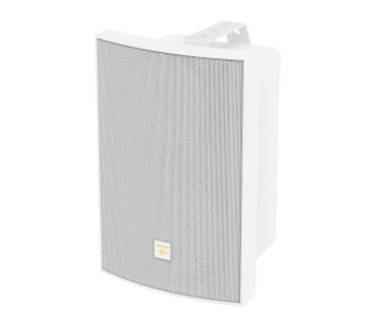
4、GEN-6011A03 Network Wall Mount Speaker
Receives SIP audio, ONVIF audio, Bluetooth, and multicast
Local broadcasting using built-in audio files
30W built-in power amplifier, with built-in MIC, supports intercom
2 control inputs and 1 control output
80MB built-in file storage (20 files, WAV/MP3)
HTTP commands (receive) |
Playback tasks (repeat, weekly timer)
POE/POE+, DC power supply
Feature Comparison Table
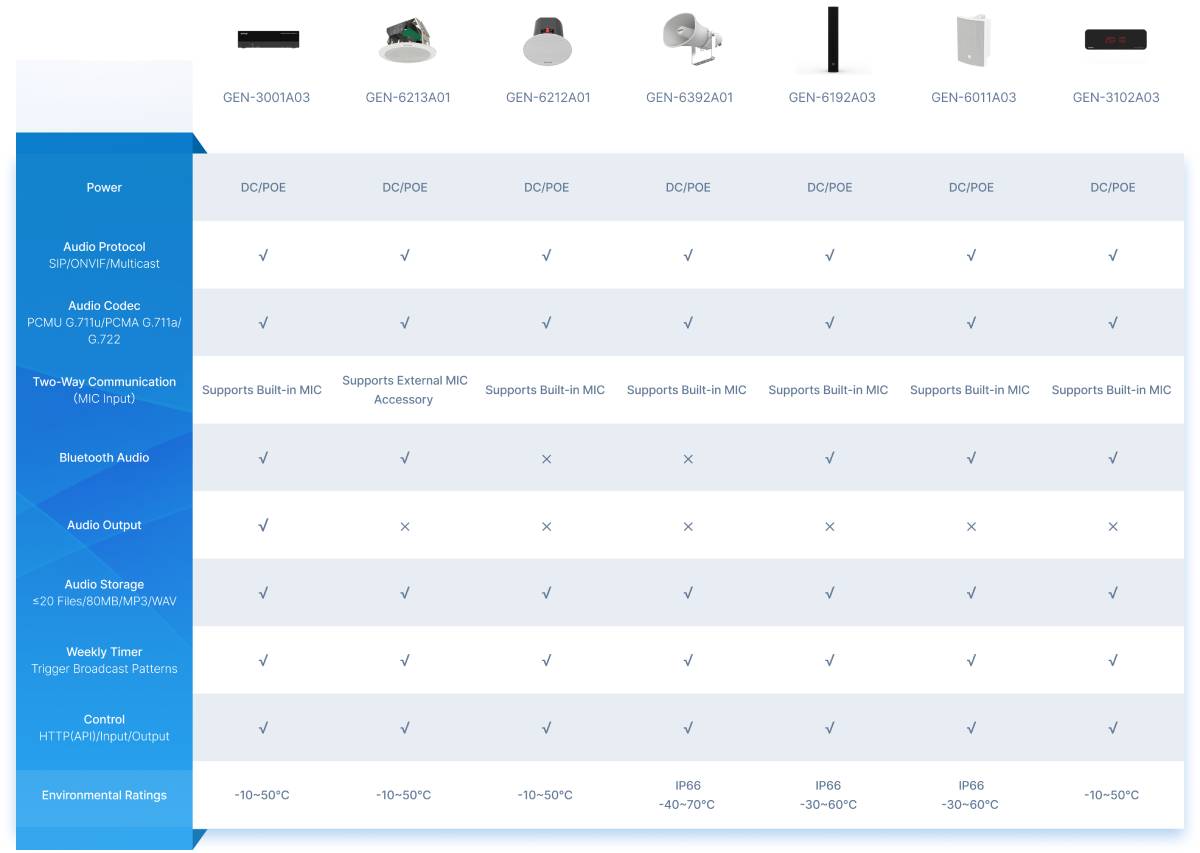
Priority Management:
Broadcast priorities can be configured independently and flexibly on each terminal device.
Weekly Timer:
The weekly timer function allows the specification of "start" time, "end" time, and valid broadcast days within the week.
Diverse Accessories:
Terminal devices can all choose to use microphone accessories, extending functions such as SIP calls and other applications.
Application Examples

1、Office Building Applications
GEN-2001 Network Paging Gateway
Scenarios
• Real-time announcement for a specific area or terminal through the VMS platform.
• Realtime paging for a specific area or terminal via SIP phone.
• Fire alarm linkage for emergency announcement.
Features
• Enable calls to a specific area or terminal
• Greater flexibility with integration into additional systems.
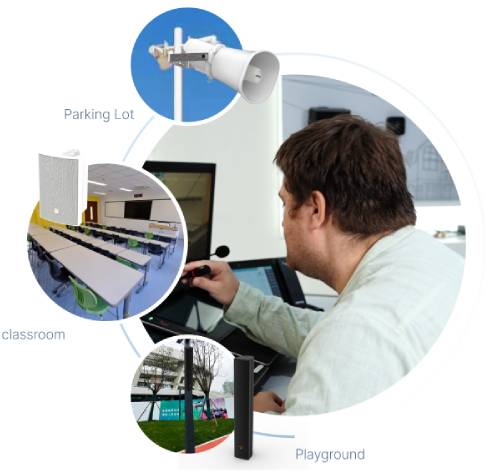
2、School Applications
GEN-9102N Network Paging Microphone
Scenarios
• Set class bells according to the school schedule.
• One-touch call to a designated area for real-time announcements.
• One-touch call to the control center for two-way intercom communication.
• One-touch operation for various combination applications, convenient and quick.
• Integration of intercom and public address system into a sinple application.
Features
• One-touch operation for various combination applications, convenient and quick.
• Integration of intercom and public broadcasting into a single system application.

3、Retail Stores Applications GEN-6213A01 Network Ceiling Speaker
Scenarios
• Bluetooth connection to ceiling speakers for background music playback.
• Can connect to NVR via ONVIF for real-time announcement.
• Supports external sensors for voice-triggered activation.
Features
• Built-in 4*3W amplifier for driving up to 3 8-ohm passive analog

4、Expansion Projects Applications GEN-3001A03 Network Audio Interfaces
Scenarios
• Expansion the analog broadcasting system to integrate with the existing SIP phone system.
• Enable real-time calling from SIP phones.
• Receive HTTP commands.
Features
• A single network terminal can achieve real-time calling, scheduled notifications, and linked broadcast voice notifications without the need for an additional server.

5、Hospital Applications GEN-6212A01 Network Ceiling Speaker
Scenarios
• Guiding Announcements: Directs patients to the correct exam room.
• Speaker supports SIP and multicast calls via external panels
Features
• Each room's equipment is independently controlled, simple to use, and does not require a server.
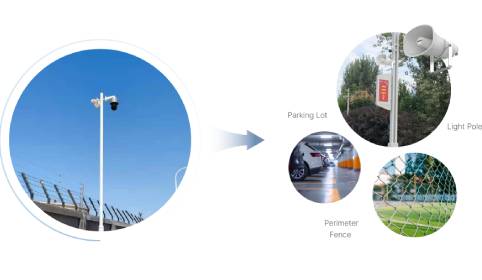
6、Security Applications GEN-6392A01 Network Horn Speaker
Scenarios
• When a camera detects an intrusion or dangerous event, it automatically triggers the horn speaker to play a built-in audio file.
• Supports SIP and ONVIF protocols, enabling real-time announcements via SIP phones or VMS platforms.
• The horn speaker supports HTTP commands and ONVIF
allole streams.
Features
• Flexible Area Monitoring: You can easily view the device's location.
• Easy Installation: The speaker is simple to install and can be used by connecting to the existing network.


 AR
AR
 EN
EN


