Small Courtroom Conference System Solution & Design Guide | SPON
A small courtroom conference system should do more than place a microphone at every seat. It should support one controlled workflow for speaking permissions, speech intelligibility, digital court recording, remote participation, and evidence presentation. The design must reflect how the court conducts proceedings, who operates the technology, and what the applicable jurisdiction recognizes as the official court record.Room size alone does not make the project simple. A short microphone working distance can improve speech capture, but hard surfaces may still create troublesome reflections. Several open microphones can raise the noise floor and reduce gain before feedback. A videoconferencing link can also introduce echo unless the local send mix, far-end return, loudspeaker, and recording paths are designed as one signal flow.
What a small courtroom system must accomplish
Compared with an ordinary meeting room, a courtroom places greater weight on speaking authority, active-speaker identification, speech intelligibility, recording status, and later review. The system design should therefore begin with the court's operating procedure, not an equipment count.• Maintain an orderly speaking process. The judge or another authorized role may need priority control, a request-to-speak queue, microphone authorization, and a limit on the number of simultaneously active microphones.• Improve speech intelligibility. Microphone placement, room acoustics, loudspeaker coverage, gain structure, and digital signal processing all affect whether listeners can understand each statement.• Create a reviewable court record. Recording requirements may include channel identification, timestamps, confidence monitoring, playback, export, storage, backup, and role-based access control. The required file format and retention period depend on the court.• Keep daily operation manageable. Presets, clear status indicators, and centralized controls can reduce repetitive setup, but every automation must be tested against the court's operating procedure.These priorities should be translated into a written requirements matrix before the bill of quantities is prepared. The matrix should identify participant roles, hearing types, room layout, recording policy, remote hearing platform, evidence sources, accessibility needs, existing infrastructure, and the person responsible for each operating task.
Courtroom positions and application requirements
Courtroom terminology and procedure vary by jurisdiction. The same microphone model may suit several locations, while authority, monitoring, privacy, and recording behavior differ by role.
Judge's Bench and hearing control
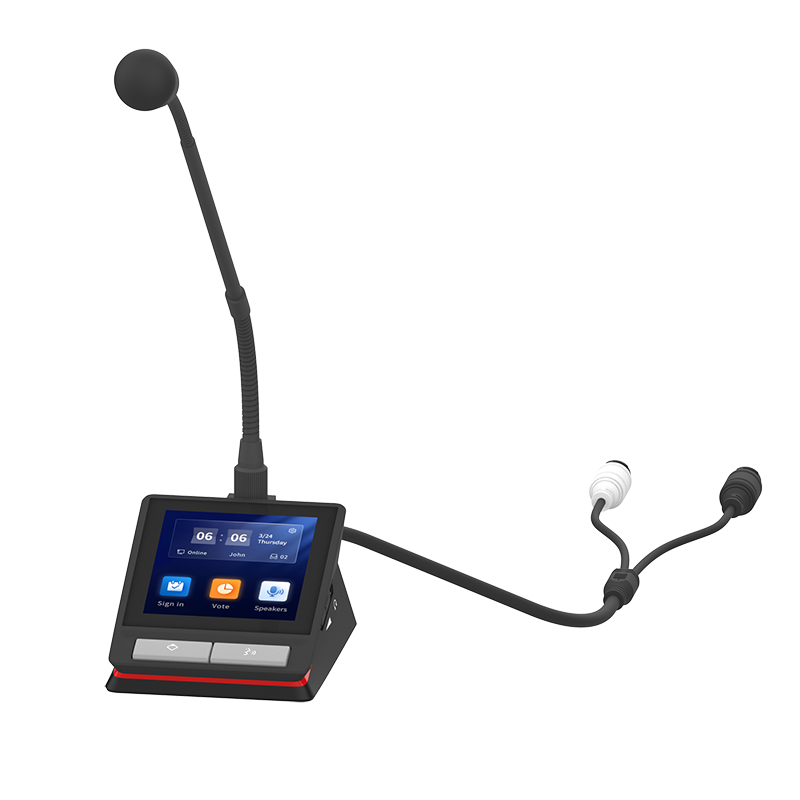
The Judge's Bench normally needs the most direct control over the speaking process. A priority microphone and operator control interface can support priority speaking, a request-to-speak queue, microphone authorization, and limits on simultaneous speakers when those functions are approved for the project.This control is procedural as well as technical. The design team should confirm whether the judge may mute an individual position, clear pending requests, authorize a remote participant, or activate a sidebar conference mode. Conference-system manufacturers often call the priority device a chairman unit and the other devices delegate units. In a courtroom specification, role-based labels such as judge, counsel, witness, and interpreter are clearer. The SPON IP Digital Conference System can manage speaking order, but its controls still need to be mapped to the court's approved workflow.
Court Clerk, Court Reporter, and recording operator roles
The Court Clerk and Court Reporter are distinct roles, although smaller courts may combine some technical tasks. The Court Clerk commonly manages case materials, exhibits, and administrative workflow. A Court Reporter creates the verbatim record by stenographic or other approved means. Where the court uses digital court recording, a dedicated operator or authorized staff member may be responsible for recording assurance. The system design should never assume that one person performs all three functions.The relevant interface may show a visible recording-status indicator, input levels or channel activity, fault messages, case or hearing presets, confidence monitoring, playback, and time-linked annotations. Availability depends on the selected recording and control platforms. The operating plan should also define what happens if the primary recording path fails, who may intervene, and whether a redundant recorder is required.
Counsel Tables and the Witness Stand
At Counsel Tables and the Witness Stand, close-talking microphones can help separate speech from room noise. Placement still matters more than microphone count. The designer should check working distance, polar pattern, desktop reflections, cable routes, sightlines, accessibility, and whether each position is fixed or shared.When several microphones remain open, each additional input can add room noise and reflected energy. Speaking permissions, active-microphone limits, and appropriate mixing can reduce unnecessary pickup. Automatic microphone mixing may help in some designs, but it is not a universal answer. Its behavior must be tested with courtroom sound reinforcement, far-end audio, and any mix-minus routing.Witness and expert testimony may need to reach the courtroom, remote participants, and the official recording at the same time. A dedicated Witness Stand microphone and a clearly documented signal path make it easier to verify what each destination receives. If the project includes an interpreter, assistive listening system, attorney-client consultation mute, or sidebar conference, that function should be included in the routing plan before commissioning.
Jury Box, Bailiff's Station, and Public Gallery
In U.S.-style layouts, the Public Gallery is normally separated from the courtroom well by the bar. A Jury Box and Bailiff's Station may also be present, depending on the court and proceeding. These areas need role-appropriate coverage and controls, not simply another copy of the Counsel Table design.The goal of courtroom sound reinforcement is speech intelligibility and even coverage, not maximum loudness. Whether a small courtroom needs voice lift depends on talker-to-listener distance, room acoustics, ambient noise, seating layout, accessibility requirements, and the target listening level.Speaker placement should provide useful coverage while preserving feedback margin around open microphones. The design should also consider sound leakage outside the courtroom and whether adjacent zones need different levels. A room survey and field tuning are more dependable than choosing speaker quantities from floor area alone.
Remote proceedings and evidence presentation
Remote proceedings require more than connecting a videoconferencing endpoint. The courtroom needs a defined send mix, a far-end return path, acoustic echo cancellation, loudspeaker routing, privacy controls, and an approved recording policy. Acoustic echo cancellation, or AEC, reduces far-end audio that would otherwise return through local microphones. Mix-minus routing prevents a participant from receiving an inappropriate copy of their own audio.A published Biamp courtroom design example shows how sound reinforcement, separate loudspeaker zones, AEC, videoconferencing, and multitrack recording can interact. It also notes that an automixer or automatic gain control can reduce the effectiveness of a particular mix-minus design. This illustrates an architecture tradeoff, not a template for every small courtroom.Electronic evidence adds another permission and routing layer. The project team should identify approved source connections, judicial preview or approval requirements, Witness Stand and Public Gallery displays, program audio, annotation needs, and whether presented content or audio becomes part of the official record.
4 common problems in small courtrooms
Overlapping speech and too many open microphones
Ordinary meeting equipment may not provide the role controls needed for a hearing. When several participants open microphones at once, overlapping speech affects both courtroom order and recording quality.Design response: define speaking permissions first. Then configure the judge's priority control, request-to-speak queue, active-microphone limit, and mixing strategy around that workflow. Test interruption and recovery with the actual operator control interface.
Audible sound that is difficult to understand
A small room can still have strong reflections, background noise, poor microphone distance, and feedback. Turning up the loudspeakers may increase the problem rather than solve it.Design response: use close and consistent pickup where practical, select the microphone polar pattern for the seating layout, manage open microphones, tune the digital signal processor, or DSP, and design loudspeaker coverage for occupied listener positions. Confirm the result under normal operating conditions, not only in an empty courtroom.
Court recordings that are difficult to review
A single mixed recording may be simple to operate, but it can make a quiet speaker harder to isolate and can slow later review. Separate channels by seat or role can improve identification and troubleshooting, although they add channel mapping, storage, software, and privacy requirements.Design response: decide whether the court needs a program mix, discrete recording channels, or both. Document channel names, timestamps, confidence monitoring, playback, export, access control, backup, and recovery. Speaker-linked metadata, searchable markers, encryption, redundant recording, and audit logs should be specified only when the selected platform and court policy support them.
Too many separate systems before a proceeding
Conference control, DSP, digital court recording, videoconferencing, evidence presentation, and room control may come from different platforms. Separate interfaces can create repetitive checks and unclear responsibility when a fault occurs.Design response: use coordinated presets and a focused operator interface where integration is confirmed. Define which system owns each function, which interfaces are documented, and what the operator should do when one dependency is unavailable. Centralized control is valuable only when it shows accurate status and has predictable failure behavior.
How the system supports a complete proceeding
Pre-hearing preparation
Load the approved hearing preset and check every required signal path. This includes microphones, loudspeaker zones, recording inputs, storage availability, local send and far-end return audio, evidence-program audio, cameras and displays where applicable, privacy controls, and backup procedures.The checklist should define pass or fail conditions and the person responsible for resolving each exception. A green icon is not sufficient unless it represents the function the operator needs to verify.
Controlled speaking
Configure permissions for the judge, Court Clerk, counsel, parties, witnesses, interpreters, and remote participants. The judge's priority control manages the speaking process, while the audio system provides consistent pickup and routes each source to its approved destinations.Test the system with realistic turn-taking, interruptions, quiet speakers, multiple requests, and any sidebar or confidential consultation procedure. These scenarios reveal control and routing problems that a simple microphone tap test may miss.
Synchronized digital court recording
The recording system should capture the approved channels and make recording status visible to the responsible operator. If the workflow uses timestamps, annotations, bookmarks, or role metadata, confirm that they remain associated with the correct matter and audio after export.Confidence monitoring is important because a recording application can appear active while receiving the wrong source. Record and play back a short test from every required channel before acceptance and after any material configuration change.
Post-hearing storage and archiving
After the proceeding, the court may need to export, restrict, retain, back up, or transfer the record. The exact process depends on local rules and the selected court systems. The integrator should document file locations, access roles, naming conventions, backup destinations, recovery steps, and responsibility for long-term retention.The workflow is straightforward to describe but must be verified in practice: pre-hearing check, controlled speaking, synchronized recording, and post-hearing archiving.
Five design priorities for a small courtroom
Design permissions around courtroom roles
Do not give every seat the same behavior by default. Create a permissions matrix showing who may request to speak, approve a request, mute a seat, activate privacy, monitor audio, start or verify recording, and control evidence or remote participants.
Optimize microphone placement instead of quantity
Choose the microphone type, position, and working distance from the floor plan and user workflow. Check whether participants can maintain a consistent distance without blocking documents or sightlines. Confirm the maximum number of active microphones and how unused inputs are managed.
Prioritize speech intelligibility
Courtroom audio is speech-critical. Design for natural and consistent listening throughout the occupied area. Document the room conditions, tune the system with representative ambient noise, and agree on project-specific acceptance criteria instead of relying on a generic volume target.
Design remote audio as a full-duplex signal path
Remote audio needs a local send mix, far-end return, AEC reference signal, courtroom reinforcement decision, recording route, and defined privacy behavior. The conferencing platform or codec, DSP, network, and recording system must be evaluated as one end-to-end signal path.
Make operation simple and observable
Presets and centralized control can reduce setup time, but only when the operator can see the state that matters. Show microphone activity, recording status, remote connection status, active evidence source, and system faults to the appropriate role. Keep engineering adjustments separate from routine operator controls.
Value of a well-designed small courtroom system
A coordinated system can improve the hearing process in four practical ways.• More consistent speaking order: role-based permissions, request-to-speak queues, and judicial priority control support the approved procedure.• Better speech intelligibility: close pickup, deliberate microphone management, DSP, and appropriate reinforcement reduce avoidable noise and coverage problems.• A more usable record: channel planning, monitoring, timestamps, and documented storage make later review more manageable when the recording platform supports them.• Lower operational burden: tested presets, focused status displays, and a repeatable pre-hearing check reduce last-minute troubleshooting.These are design objectives rather than automatic product outcomes. They should be linked to the court's requirements and verified during commissioning.
Typical system components and BOQ categories
An exact bill of quantities cannot be selected from room size alone. It depends on the number and type of courtroom positions, sound-reinforcement requirements, recording architecture, remote proceedings, evidence presentation, accessibility, network infrastructure, and backup requirements.
A basic in-room proceeding may require role-based microphones, conference control, digital recording, and a simple operator interface. A hybrid proceeding adds videoconferencing, AEC, mix-minus routing, cameras, displays, and network services. A more integrated courtroom may add discrete recording channels, evidence presentation, assistive listening, storage integration, and advanced control. Every added function should answer a documented requirement.
Commissioning and acceptance checklist
Agree on the acceptance plan before configuration begins. For each test, record the project-approved criterion, expected result, actual result, supporting evidence, responsible party, and any open issue.
Audio and speaking control
• Test every microphone from the normal user position.• Verify the judge's priority control, request-to-speak queue, active-microphone limits, and mute behavior.• Listen from representative seats and confirm coverage under normal room conditions.• Test feedback margin and recovery after an interruption or preset change.• Confirm privacy and sidebar behavior where those functions are required.
Recording and review
• Confirm the channel map, source labels, and visible recording status.• Record and play back every required courtroom position, remote source, and evidence-audio path.• Verify timestamps, annotations, markers, or metadata where included in scope.• Test export, access restrictions, backup, and recovery with the responsible court staff.• Document the response to a storage, recording-software, or network-service failure.
Remote proceedings and evidence paths
• Test the local send mix and far-end return in both directions.• Confirm AEC performance and ensure that far-end participants do not receive disruptive echo.• Verify privacy mute, courtroom reinforcement, and recording behavior during a remote session.• Test every approved evidence source on the correct displays and through the required audio path.
Operation and handover
• Verify presets, status indicators, fault messages, and user permissions.• Train the judge, Court Clerk, recording operator, and technical support staff on the controls relevant to their roles.• Deliver the signal-flow diagram, channel map, equipment list, configuration backup, operating guide, and open-issue log.• Repeat representative tests after final furniture, network, and room changes.
Summary
A well-designed small courtroom conference system should support more than basic audio. It needs to combine clear speech, controlled speaking permissions, digital court recording, remote proceedings, evidence presentation, and simple system operation in one coordinated workflow. The best design starts with courtroom roles and hearing procedures, then selects the right microphones, DSP, loudspeakers, recording system, videoconferencing equipment, and control tools. By planning the full signal path and testing each function before handover, courts can achieve clearer communication, more orderly hearings, reliable records, and easier daily management.
For a preliminary design, prepare the courtroom layout, user roles, hearing types, speaking permissions, recording needs, remote hearing platform, evidence requirements, existing system, and project timeline.SPON can then recommend the right conference microphones, professional audio,Contact SPON with your project requirements for further discussion.
FAQS
Q1: Can a small courtroom use an ordinary conference system? 

Some standard conference equipment may be suitable, but the courtroom should not be designed as an ordinary meeting room by default. Courtroom projects often need role-based permissions, recording assurance, defined privacy behavior, remote-audio routing, and formal system documentation. Confirm those requirements before selecting the platform.
Q2: Why does the Judge's Bench need priority control?
A priority microphone or equivalent control gives the judge, or another authorized role, greater control over speaking priority and pending requests. The exact functions should match the court's procedure and be tested with every participant microphone and the operator interface. “Chairman unit” is acceptable as a product category, but “judge's priority microphone” is usually clearer in a courtroom-facing specification.
Q3: Can the courtroom system connect to videoconferencing?
Yes, when the selected conference system, DSP, and videoconferencing endpoint provide compatible interfaces. The design must cover full-duplex routing, AEC, local playback, privacy, recording, network requirements, and failure behavior. A physical or software connection alone does not prove that the end-to-end workflow will perform correctly.


 2026-10-16
 Author: SPON
 Page view: 148


 AR
 EN