How SPON unified platform Enable Efficient Broadcast and Intercom Communication
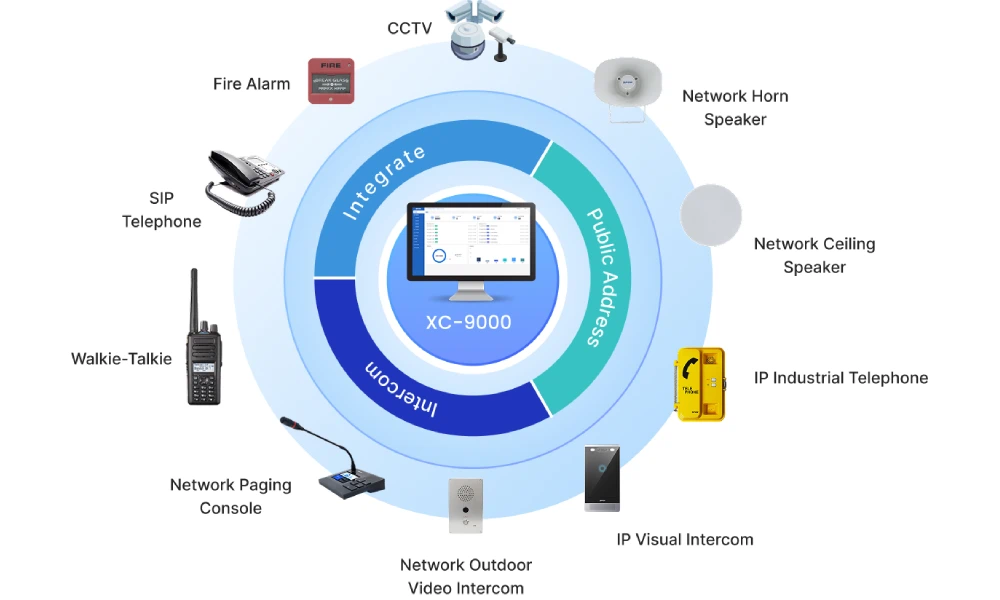
In today’s connected environments, effective communication is no longer limited to simple voice announcements or isolated intercom systems. Organizations increasingly require integrated, real-time, and scalable communication solutions that can operate across multiple locations and platforms. Traditional PA systems, while reliable for one-way broadcasting, often lack flexibility, interactivity, and centralized control.To meet these requirements, modern systems combine IP-based broadcasting, two-way intercom communication, and seamless integration with unified communication (UC) platforms. By leveraging standard protocols such as SIP and RTP, audio devices can become part of a broader communication ecosystem, bridging the gap between physical audio infrastructure and modern digital collaboration tools.The SPON unified platform is designed based on this concept. It integrates broadcasting, intercom, and third-party connectivity into a single system, providing a flexible and scalable solution for today’s communication needs.This blog explores how SPON unified platform enables broadcasting, intercom communication, third-party integration, and unified management, providing a comprehensive solution for modern communication needs.
Platform Deployment and Protocols
The unified platform is designed with a highly flexible architecture, allowing it to be deployed in various network environments and system infrastructures to meet different project requirements.
Flexible Deployment Options
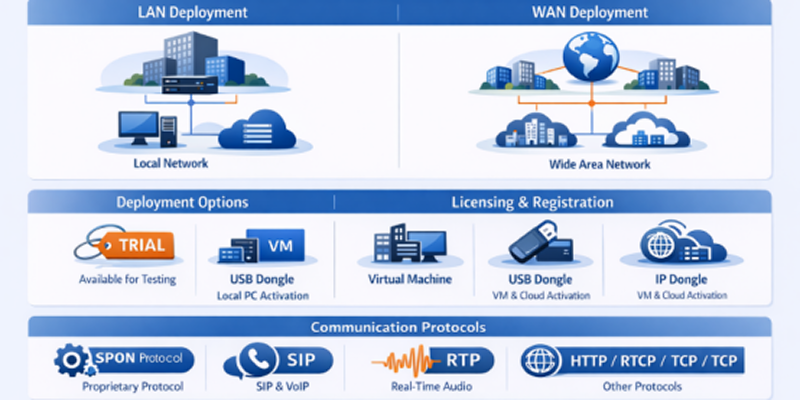
The unified platform can be deployed in both Local Area Networks (LAN) and Wide Area Networks (WAN), making it suitable for single-site and multi-site applications:
•LAN Deployment
Ideal for campuses, office buildings, and factories, where all devices are connected within the same network for low-latency communication and simplified configuration.
•WAN Deployment
Supports cross-region or multi-branch scenarios, enabling centralized management of devices distributed across different locations via the internet or private networks. In terms of system installation, the unified platform supports multiple deployment forms:
•Physical PC Deployment
Installed directly on a local computer or server, suitable for small to medium-sized projects.
•Virtual Machine Deployment
Can be deployed on virtualized environments (e.g., VMware), improving resource utilization and system flexibility.
•Cloud Server Deployment
Enables remote access and centralized management across geographically distributed sites, ideal for large-scale or cloud-based architectures.
Licensing and Registration Mechanisms
To ensure system security and proper authorization, the unified platform adopts different licensing methods depending on the deployment type:
A trial activation license for the unified platform is available upon request from the SPON team, allowing temporary access for testing and evaluation.•USB Dongle Licensing (Local PC Deployment)
A physical USB license key is required for system activation when installed on a PC. •Remote IP Dongle Licensing (VM & Cloud Deployment)
For virtual machines and cloud servers, licensing is handled via a remote IP-based dongle, allowing flexible and centralized license management without physical hardware dependency. This dual licensing approach ensures both security and deployment flexibility across different environments.
2.3 Communication Protocols
The unified platform supports both proprietary and standard communication protocols, enabling reliable operation as well as seamless integration with third-party systems.
Used for internal communication between the unified platform and SPON devices Ensures stable device registration, control commands, and efficient data transmission Optimized for performance, reliability, and large-scale deployments
Enables integration with unified communication (UC) platforms and VoIP systems Allows devices to function as SIP endpoints for broadcasting and intercom calls Supports interoperability with platforms such as Microsoft Teams, IP PBX, and SIP phones
Handles real-time audio streaming with low latency Ensures synchronized and high-quality voice transmission during broadcasting and intercom
RTCP: Monitors transmission quality and provides feedback HTTP/HTTPS: Used for system configuration, web access, and API integration TCP/UDP: Underlying transport protocols for control and media data
The Importance of Unified Platform Management
Since all communication systems expand to various zones and locations, it would be inefficient and hard to maintain the devices separately. The conventional methods tend to create disjointed control, their performance tends to be inconsistent, and their workload tends to be higher.
XC-9000 platform addresses these issues by providing a single platform management, which allows the central control of all the devices and functions.
Streamlined Operation: Each device is programmable, monitored and controlled through a single interface, simplifying and minimizing human intervention.
Enhanced Efficiency: Multi-zone broadcasting, scheduling and intercom can be performed swiftly and reliably.
Increased Reliability: Real-time tracking and centralized logs are used to detect and fix problems in time.
Enhanced Security: it is possible to control user permissions and communication security system wide.
Scalability: It is easy to add new devices and sites without interfering with the current operations.
Overall, unified management will transform a disjointed system into a centralized, efficient, and scalable communication platform, which is crucial to current PA and intercom deployments.
Broadcasting Functionality
The unified platform provides a comprehensive and flexible broadcasting system, supporting multiple audio sources and triggering methods to meet various application requirements, from daily announcements to emergency broadcasting. In a school environment, for example, the platform supports scheduled broadcasting to automatically play class bells, background music, and daily announcements without manual intervention. When real-time communication is needed — such as a sudden facility notice or an event reminder — the system enables real-time broadcasting via streaming audio, file playback, or Text-to-Speech (TTS). In the event of a fire or other emergency, the platform integrates directly with fire alarm systems to trigger emergency broadcasting, automatically overriding regular programs to deliver clear evacuation instructions to designated zones. For situations requiring live human intervention, staff can use an IP microphone to make instant announcements to specific zones or across the entire facility. Together, these capabilities ensure that the unified platform meets both routine and critical communication needs efficiently and reliably.
Scheduled Broadcasting
The unified platform supports scheduled broadcasting, allowing users to pre-configure playback tasks based on time and date.
- Create daily, weekly, or custom schedules
- Automatically play pre-recorded messages or background music
- Ideal for routine operations such as school bells, shift reminders, or timed announcements
This feature reduces manual operation and ensures consistent and timely communication.
Real-Time Broadcasting
The platform enables real-time broadcasting with multiple audio input methods:
- Streaming Audio Broadcasting
Supports live audio streaming from external sources, enabling real-time content distribution such as live events or announcements.
Users can select and play stored audio files directly through the platform for immediate announcements.
- Text-to-Speech (TTS) Broadcasting
Converts text into speech automatically, allowing quick generation of announcements without pre-recorded audio. These options provide flexibility for both planned and on-demand communication needs.
Fire Alarm Integration Broadcasting
The unified platform supports integration with fire alarm and emergency systems to enable automatic emergency broadcasting.
- Triggered by external alarm signals
- Automatically overrides regular broadcasts
- Delivers pre-configured emergency messages to designated zones
This ensures rapid response and clear instructions during critical situations, enhancing safety and compliance.
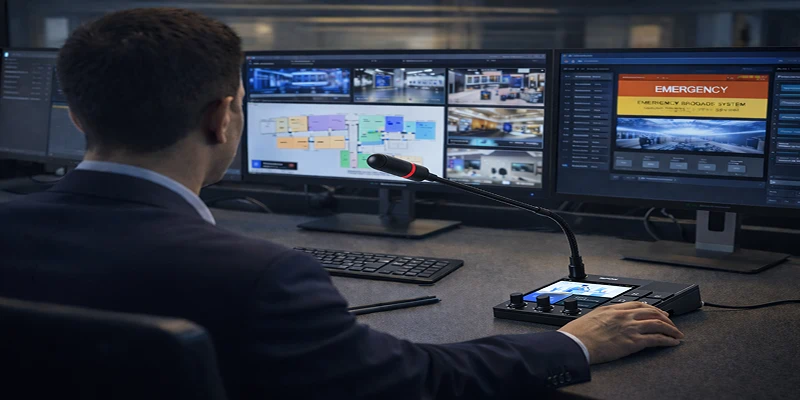
IP Microphone Broadcasting
The system supports IP microphone broadcasting for real-time voice announcements.
- Dedicated paging microphones or consoles
- Zone selection for targeted broadcasting
- Priority control to override lower-level audio sources if necessary
This is ideal for manual announcements, emergency instructions, or daily operational communication.
Intercom Functionality
The unified platform provides a powerful intercom system that supports audio and video communication, enabling efficient interaction across different zones and devices. It is designed to meet daily communication needs as well as critical emergency scenarios.In a factory environment, for instance, two-way audio and video intercom allows security personnel at the main gate to visually verify visitor identity before granting access. When a production issue requires coordination across multiple teams, multi-party communication enables the control room, maintenance crew, and safety supervisor to join the same call and resolve the problem collaboratively. To ensure calls always reach the right person, the system supports call transfer — for example, a visitor calling the school front gate can be seamlessly redirected to th office if the guard is unavailable. In emergency situations, call priority management ensures that high-priority calls, such as a fire alarm trigger, automatically override lower-priority conversations to deliver critical instructions immediately. These features work together to provide a flexible, reliable, and efficient intercom solution for both daily operations and urgent scenarios.
Two-Way Audio and Video Intercom
The unified platform supports real-time two-way communication, including both audio and video. High-quality voice communication with low latency Optional video integration for enhanced situational awareness Suitable for entrances, control rooms, and security checkpoints This enables more intuitive and efficient communication, especially in security-sensitive environments
Multi-Party Communication
The system supports multi-party intercom, allowing multiple endpoints to participate in the same communication session. One-to-many or many-to-many communication Group calling for coordination across departments or zones Useful for emergency coordination and team collaboration This improves communication efficiency in complex scenarios.
Call Transfer
The unified platform supports flexible call transfer functionality to ensure calls reach the appropriate personnel. Transfer calls between devices or operators Redirect incoming calls to designated terminals Reduce missed or unattended calls This enhances responsiveness and workflow efficiency in daily operations.
Call Priority Management
To ensure critical communication is not interrupted, the platform provides call priority control. Different priority levels can be assigned to calls High-priority calls can override ongoing lower-priority communications Ensures emergency or important messages are delivered immediately This guarantees reliable communication during urgent situations. Summary, with features such as audio/video intercom, multi-party communication, call transfer, and priority management, the unified platform delivers a flexible, reliable, and efficient intercom solution for various applications.
Third-Party System Integration
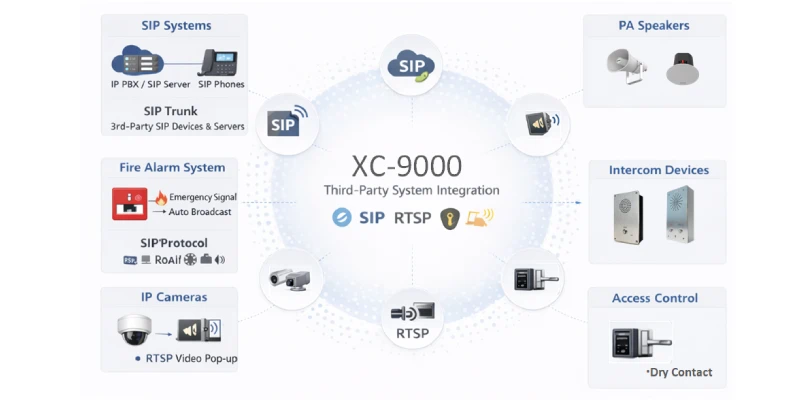
SIP-Based Integration with UC and VoIP Systems
- Connect with IP PBX or SIP servers through SIP Trunk
- Enable SIP phones to initiate intercom calls and broadcasting
- Support third-party SIP devices to register directly to the unified platform
Fire Alarm System Integration
- Receive alarm signals from fire control systems
- Automatically trigger emergency broadcasting
- Override normal audio to ensure emergency messages are delivered
Video Integration via RTSP
- Bind cameras to intercom devices
- Enable video pop-up during intercom calls
- Provide real-time visual verification for enhanced security
This allows operators to see and communicate simultaneously, improving decision-making and response efficiency.
Access Control Integration
The unified platform can be integrated with access control systems to enable remote door control during intercom sessions.
- Link intercom devices with door access systems
- Unlock doors remotely during communication
- Improve visitor management and security workflows
This creates a more intelligent and interactive access control solution.Summary ,through integration with SIP systems, fire alarms, video surveillance, and access control, the unified platform extends beyond a traditional PA system to become a central communication and control platform, enabling smarter and more efficient operations.
Project Applications
The unified platform is widely applied across various industries, providing reliable and efficient communication solutions tailored to different scenarios. With its flexible deployment, unified management, and strong integration capabilities, the platform can be adapted to meet the specific needs of environments such as enterprise buildings, campuses, public spaces, and industrial facilities. It enables seamless broadcasting, intercom communication, and system integration, ensuring smooth daily operations as well as rapid response in emergency situations.
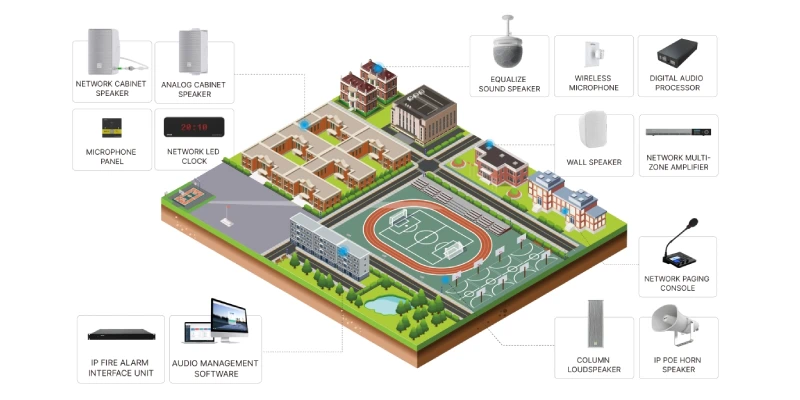
School Campus
The unified platformundefined provides an efficient and intelligent communication solution for school campuses, supporting both daily operations and emergency management.The main functions are as follows:
- Scheduled Broadcasting: Automatically plays class bells, background music, and routine announcements based on predefined schedules
- Zone-Based Announcements: Enables targeted communication to specific buildings, floors, or outdoor areas
- Emergency Broadcasting: Integrates with alarm systems to deliver instant emergency instructions across the campus
- Intercom Communication: Allows classrooms, offices, and security centers to communicate in real time
- Centralized Management: Administrators can monitor and control all devices from a single platform
This ensures orderly daily operations, improved communication efficiency, and enhanced campus safety.
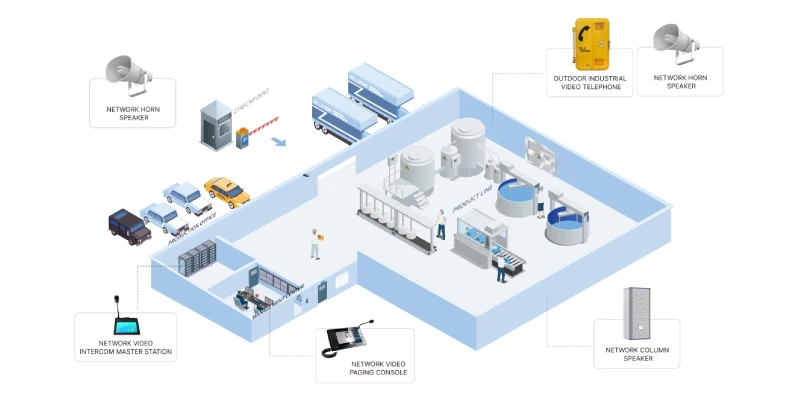
Industrial Facilities
In industrial environments, the unified platform supports reliable communication for both production coordination and safety management.
The main functions are as follows:
- Real-Time Broadcasting: Delivers instant instructions or alerts to production areas and workshops
- Noise-Resistant Communication: Supports clear audio transmission even in noisy environments (with suitable devices)
- Emergency Integration: Works with fire alarms and safety systems to trigger immediate evacuation broadcasts
- Intercom for Coordination: Enables communication between control rooms, production lines, and security teams
- Remote and Multi-Site Management: Supports centralized control across multiple plants or locations
This helps improve operational efficiency, worker safety, and rapid response to critical situations.
Conclusion
The unified platform brings together broadcasting, intercom communication, unified management, and third-party integration into a single, cohesive system. By leveraging IP-based architecture and standard protocols such as SIP and RTP, it enables seamless connectivity across devices, platforms, and locations.With its flexible deployment options, powerful functionality, and strong compatibility with external systems, the unified platform not only enhances daily communication efficiency but also ensures rapid and reliable response in critical situations. Whether in schools, industrial facilities, or other complex environments, the platform delivers a scalable, secure, and future-ready communication solution.

FAQS
Q1: Can The unified platform be integrated with existing SIP or VoIP systems? 

Yes. It supports SIP protocol and SIP Trunk, allowing seamless integration with IP PBX, SIP servers, and SIP phones for intercom and broadcasting.
Q2: Does the system support multi-site deployment?
Yes. It can be deployed over LAN or WAN, enabling centralized management of devices across multiple locations such as campuses, factories, or branch offices.
Q3: What types of broadcasting are supported?
The platform supports multiple broadcasting modes, including scheduled broadcasting, real-time broadcasting (streaming, file playback, and TTS), emergency broadcasting, and microphone paging.
Q4: Can The unified platform integrate with third-party systems like fire alarms or cameras?
Yes. It can integrate with fire alarm systems for automatic emergency broadcasting, IP cameras via RTSP for video pop-up during intercom, and access control systems for remote door unlocking.
Q5: How is the system licensed and deployed?
The unified platform supports flexible deployment on PC, virtual machines, or cloud servers. Licensing can be activated via USB dongle (for local deployment) or remote IP dongle (for VM and cloud). Trial licenses are also available for testing.



 2026-04-17
 Author: Lennon
 Page view: 635



 AR
AR
 EN
EN


